Services
Electricity Bill
Pay your electricity bills for all Nigerian distribution companies instantly on Mabro. IKEDC, EEDC, Eko, Abuja Discos and more.
Services
Pay your electricity bills for all Nigerian distribution companies instantly on Mabro. IKEDC, EEDC, Eko, Abuja Discos and more.
Mabro makes paying your electricity bill effortless. Whether you're on prepaid or postpaid, you can pay your electricity bills for any distribution company (DisCo) in Nigeria directly from your Mabro wallet — no queues, no delays, no stress.
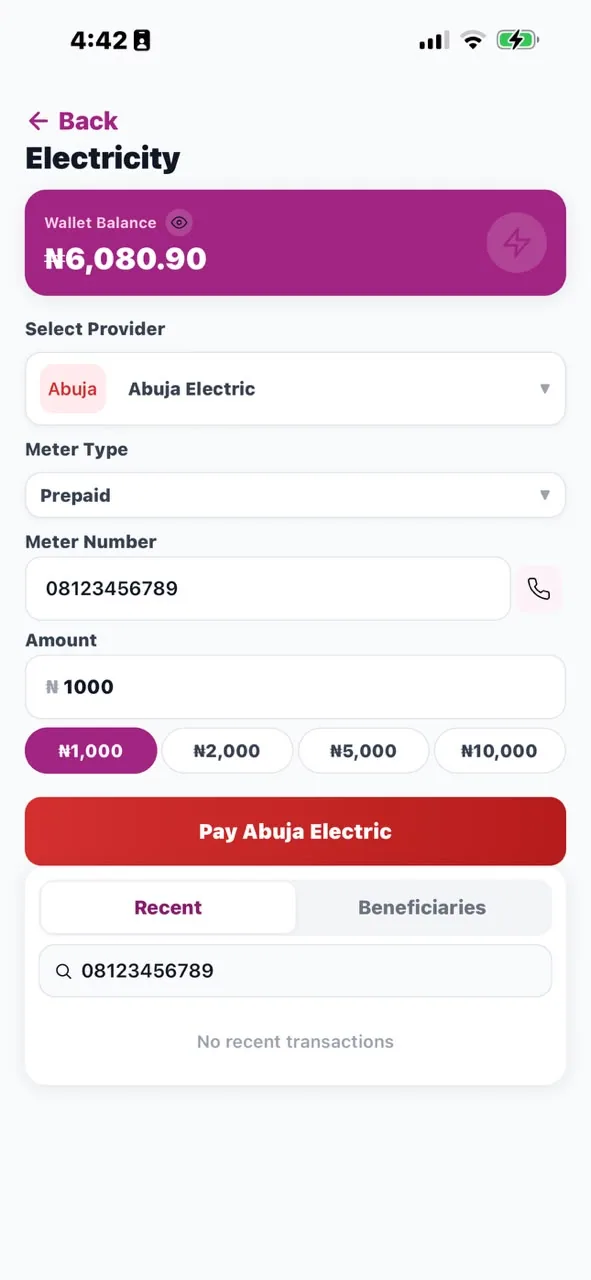
Simply enter your meter number or account number, enter the amount, and confirm with your PIN. Your payment is processed instantly and your meter is credited or your account updated immediately.
Tap "Electricity Bill" from the Mabro home screen.
Choose your electricity distribution company from the list.
Input your prepaid meter number or postpaid account number. The app validates the meter and pulls up your details.
Enter the amount — minimum payment varies by DisCo. Confirm with your 6-digit PIN. For prepaid meters, you'll receive your token instantly.
Mabro pays electricity bills for every distribution company in the country, prepaid and postpaid, from your wallet. The queue at the DisCo office and the scratched recharge card are both avoidable: enter your meter number, enter the amount, confirm with your PIN.
On a prepaid meter you are buying units, and the units arrive as a token — the long number you punch into the meter to load the credit. Enter your prepaid meter number, choose the amount and pay. The app validates the meter number with the distribution company first, then delivers the token in the app and by SMS.
Keep the token until it is loaded. If it does not arrive within a couple of minutes, contact support with the transaction reference and it can be traced.
On a postpaid account you are settling a bill rather than buying units, so there is no token — the payment is applied to the account and the balance updates. Enter the account number from your bill in the same way.
Mabro covers the Nigerian DisCos, including IKEDC, EKEDC, EEDC, AEDC, PHED, KEDCO, IBEDC, JED, KAEDCO and BEDC. Choose yours from the list in the app.
You can pay any meter or account, not just your own — a parent's house, a shop, or a property you manage. Enter their meter number and pay from your wallet. Save it as a beneficiary and future payments take seconds.
The payment goes through to the distribution company and your meter or account is credited. Prepaid customers receive a token; postpaid customers see the balance reduce. Every payment is recorded in your transaction history with its reference, so a disputed charge can be checked without hunting for a receipt.
Your meter number is printed on your prepaid meter body. For postpaid, your account number is on your monthly bill. It's typically 6-13 digits long.
Prepaid tokens are delivered instantly via the app and SMS. If you don't receive it within 2 minutes, contact support.
The app validates the meter number with the DisCo before processing. If the meter number is not found, the transaction won't proceed.
Minimum payment amounts vary by distribution company. The app will show the minimum required amount for your selected DisCo.
Yes! Enter their meter or account number and pay from your wallet. You can also save their meter number as a beneficiary for future payments.
A token is the code that carries the units you bought onto a prepaid meter. You pay for the amount you want and the token is delivered in the app and by SMS for you to enter on the meter.
Yes. Enter your meter number in the app, choose the amount and confirm with your PIN — the payment reaches the distribution company and the meter is credited without a trip to a queue.
No. Mabro pays both prepaid meters, where you receive a token, and postpaid accounts, where the payment is applied to your bill.
Any applicable fee is shown before you confirm, along with the amount that will be applied to your meter or account.
Download Mabro and pay your electricity bills instantly — no queues, no stress.
Get the App