Services
Buy & Sell Giftcards
Sell the giftcards you already have for naira, or buy giftcards you need — with the rate shown before you confirm.
Services
Sell the giftcards you already have for naira, or buy giftcards you need — with the rate shown before you confirm.
Mabro lets you trade giftcards in both directions. Sell a giftcard you already have and the naira value is credited to your Mabro wallet, or buy a giftcard you need and pay for it from the same wallet.
If you have ever searched for "sell giftcard", "giftcard to naira rate" or "where to sell Amazon gift card in Nigeria", this is that service — but with the rate shown to you before you commit, and no stranger to negotiate with.
The rate for each card, and the denominations accepted, are shown in the app before you confirm a trade.
The usual route for selling a giftcard in Nigeria is to hand the code to a buyer in a WhatsApp group and hope the transfer lands. If it does not, there is no one to appeal to — the code is already spent.
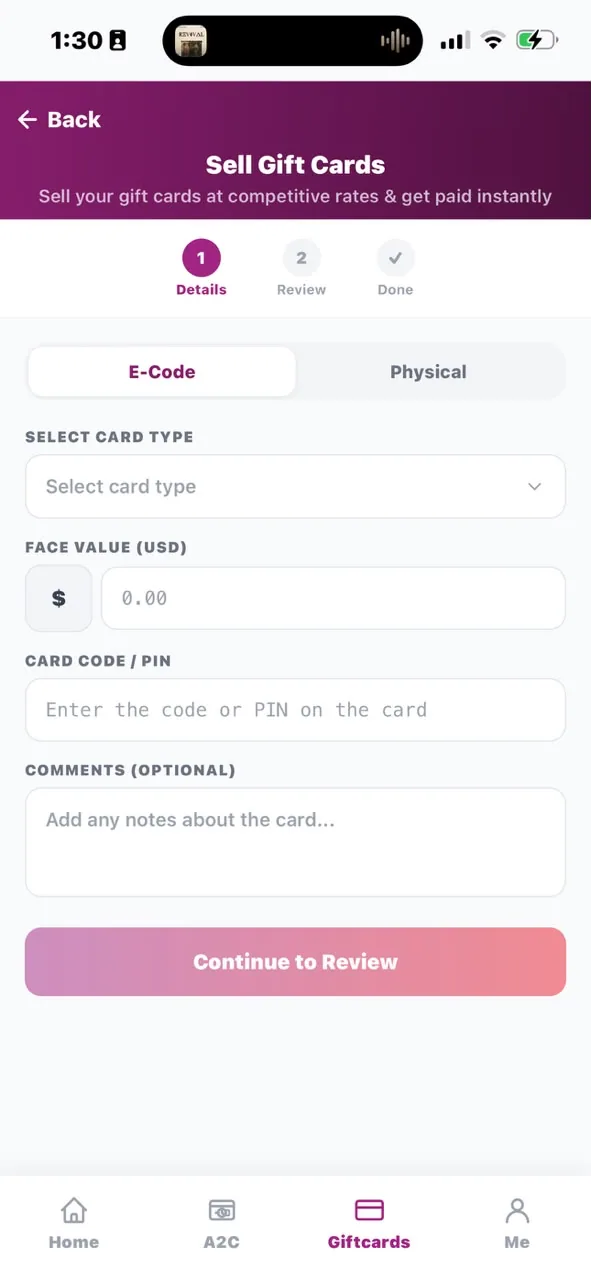
On Mabro you sell the card to Mabro. You pick the card type, enter the details, the app shows you the rate and the naira you will receive, and you confirm with your 6-digit PIN. The naira is credited to your Mabro wallet.
Mabro also sells giftcards. If you need an iTunes, Amazon, Steam or Google Play card, you can buy it from your Mabro wallet instead of hunting for a seller. Fund the wallet from any Nigerian bank, buy the card, and the details are delivered in the app.
A giftcard's naira value is not one number for all cards. It depends on the card brand and the face value, because demand differs by card type — a popular card is worth more to us than an obscure one, and larger denominations usually get a better rate than small ones.
That is why Mabro does not publish a single headline rate. Selecting your card in the app shows the rate that actually applies to it, before you commit.
Launch Mabro and choose Giftcards from the home screen.
Pick the card brand from the list, then choose whether you are buying or selling.
The rate for that card is shown before you commit, together with the naira you will receive or pay.
Review the details and confirm with your 6-digit transaction PIN.
Selling credits your Mabro wallet; buying delivers the card and debits the wallet.
Selling a giftcard credits your Mabro wallet, not your bank account directly. From the wallet you can pay bills, buy airtime or data, make transfers, or move the balance to your own bank whenever you choose.
iTunes, Amazon, Google Play, Steam, Xbox, PlayStation, Razer Gold and Sephora. Pick the card you have from the list in the app.
It depends on the card and its face value. The rate for the card you select is shown in the app before you confirm, along with the naira you will receive.
The naira value is credited to your Mabro wallet. From there you can pay bills, buy airtime or data, make transfers, or move it to your own bank account whenever you choose.
Yes. You can buy giftcards from your Mabro wallet as well as sell cards you already hold.
A BVN-verified Mabro account and your 6-digit transaction PIN. Every transaction on Mabro requires a verified account.
Mabro deals in giftcard codes, not plastic. Enter the card details in the app and the rate is shown before you confirm.
You sell to Mabro rather than to a stranger on a forum, and the rate is confirmed before you commit. Every trade needs your 6-digit PIN, and your account must be BVN verified.
It is the naira value Mabro pays for a card of a given face value. Because it differs by card type, the app shows the rate for the specific card you picked rather than one headline figure.
Download Mabro to buy giftcards or turn the ones you have into naira.
Get the App